
Document Sharing
Log in to the platform with your registration credentials and click on DOCUMENTS from the side menu to access the section.
In the DOCUMENTS section, there are two sections that allow you to share one or more documents with your therapist:
- SHARED DOCUMENTS:
Here you can share and view all your documents in PsyCare (either entered by you or shared with you by your therapist). - IDENTITY DOCUMENTS:
Here you can share and view your personal documents (e.g. your identity card)
The section SIGNED DOCUMENTS does not allow you to share with your therapist:
-
- Here you can view and download all digitally signed documents in PsyCare.
Documents Section
When you log in, you will see the SHARED DOCUMENTS section.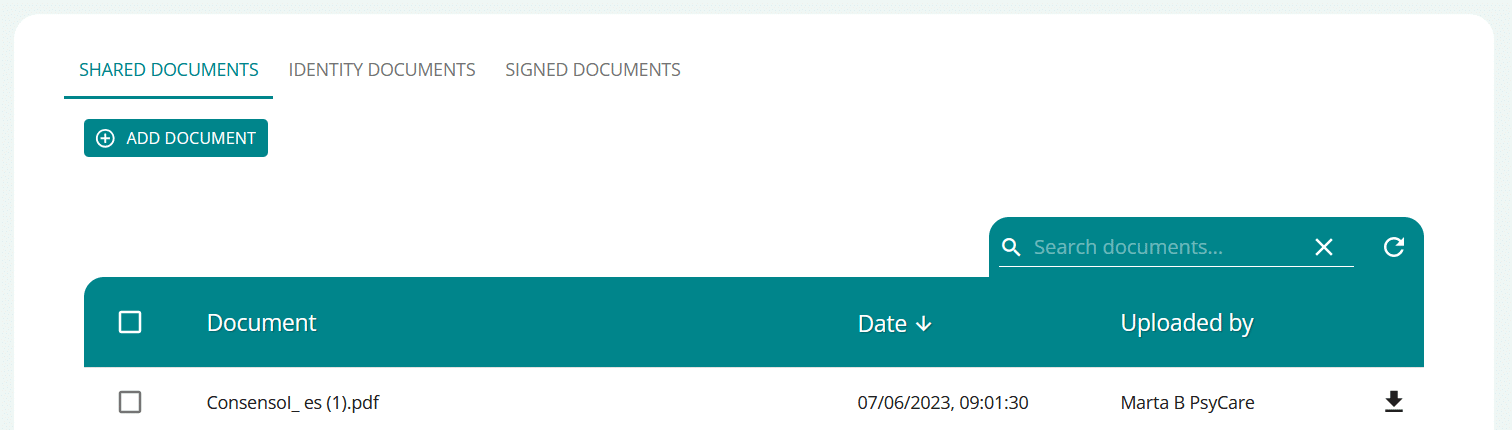
On the page you can:
- click on
 and add a new document and share it immediately on the platform with your therapist
 - with
 search for a document among those already uploaded
 - click on
 and refresh the page
 - click on
 Download the documents available
Add and share a document
- SelectADD DOCUMENT to upload a document to the platform and share it with your therapist
- Click BROWSE and choose the document to upload.
- Select CANCEL to cancel the operation.
- Select SEND to upload the selected document
- view the document in the page list
The uploaded document will be immediately shared with the therapist and available on the platform.
Identity Documents Section
By selecting the PERSONAL DOCUMENTS item (top left of the page) you can access the section.
On the page you can:
- click on and add a new personal document and share it immediately on the platform with your therapist
- The uploaded document will already be available on the platform for the therapist
- with search for a personal document among those already uploaded
- click on and refresh the page
- click on Download your existing personal documents
Add and share an Identity document
- Select ADD DOCUMENT to upload a personal document to the platform and share it with your therapist
- Click BROWSE and choose the personal document to upload.
- Select CANCEL to cancel the operation.
- Select SEND to upload the selected personal document
- View personal document in page list
The uploaded personal document (e.g., ID) will be immediately shared with the therapist and available on the platform.
SUGGESTION
Don't see the document you're looking for? Try refreshing the page.>
